Wait for signal
Wait until a signal matches a given condition.
The Wait for Signal instruction waits until a signal matches a given condition.
This instruction has four parameters:
- Signal type
- Signal
- Operator
- State
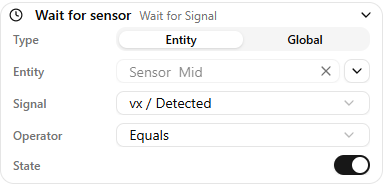
Signal type
Defines whether you are reading a global signal or an entity signal.
As described in the Signals page, global signals are configured in Settings, and entity signals come from Components in the scene.
- If Global is selected, choose the signal from the dropdown list.
- If Entity is selected, choose the entity you want to read signals from.
Signal
Select the specific signal to read, such as a sensor state.
Operator
Defines the comparison operator. Depending on the signal type (boolean, float, or integer), the available operators are:
- equal
- not equal
- greater than
- less than
State
Defines the value you want to compare against.
Warning
Expressions are supported for numeric values. See Expressions.