Move to target
Move an articulated chain to a specific target position.
The Move to Target instruction moves an articulated chain to a specific position.
This instruction has five configurable parameters:
- Controller
- TCP
- Position
- Move type
- Offset
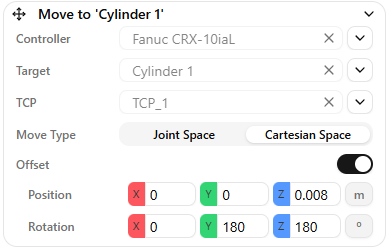
Controller
To execute a Move to Target instruction, you need an Articulation Controller component in your scene (robot, gripper, cartesian axis, or other articulated chain).
Select a controller by clicking the list button and choosing from available controllers, or drag and drop a scene object with an Articulation Controller into the field.
TCP
The TCP defines the frame used to reach the target position. By default, the TCP is the position of the last joint in the articulated body.
You can define more than one TCP by creating child frames under the last joint. These frames appear in the TCP parameter list.
Position
The Position parameter defines the target frame. You can select a frame from the scene list or drag and drop a scene object into the field.
Warning
Move to Target sends the articulation TCP (tool center point) to the selected frame position. Make sure the correct TCP is selected.
Move type
The Move type parameter can be either cartesian space or joint space (commonly called MoveL and MoveJ)
- Cartesian space move: Moves the articulated body's TCP from its current position to the target position in a straight line (MoveL). Use this when path accuracy is important.
- Joint space move: Moves by interpolating joint positions, so the TCP path is not necessarily straight (MoveJ). Use this when higher speed is more important than path accuracy.
Offset
If needed, Move to Target accepts an Offset parameter. The offset is measured along the selected frame.
You can also set an offset without a position frame. In that case, the position is set to "relative to self", which moves the chain along the configured TCP by the specified offset.
Warning
Parallel articulated chains do not support inverse kinematics. These articulations cannot use Move to Target and must use Move Joints instead.