Color Sensor
Detect object colors
The Color Sensor detects dynamic objects along a configured direction and reports the detected color and distance. Use it for color-based sorting, validation, and routing workflows.
Properties
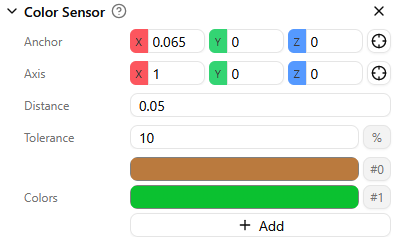
Anchor
The anchor is the reference point for the sensor. It is the origin from which the detection ray is cast.
Axis
The axis defines the direction in which the sensor looks for dynamic objects.
Trigger Distance
The trigger distance sets how far the sensor can detect objects along the selected axis. Objects outside this range are not detected.
Tolerance
Tolerance controls the maximum accepted color deviation between a detected object and the closest configured color.
A higher tolerance makes detection more permissive. A lower tolerance makes detection stricter.
Recommendation
Start with 10% tolerance, then adjust based on your model materials and expected color variation.
Colors
The colors list defines which colors the sensor can recognize. You can add multiple target colors.
The color output is mapped to the position of each color in this list.
For example, the first color returns 0, the second returns 1, and so on.
Signals
The Color Sensor component provides signals you can use in programs.
Outputs
The Color Sensor component has two outputs:
color: Integer index of the detected color in the configured color list (starts at0).distance: Float distance from the anchor point to the detected object along the sensor axis, up to the configured trigger distance.
Notes and best practices
- Position the anchor and axis so the ray points clearly at the expected detection zone.
- Tune tolerance gradually to avoid false positives.